CWV Analytics
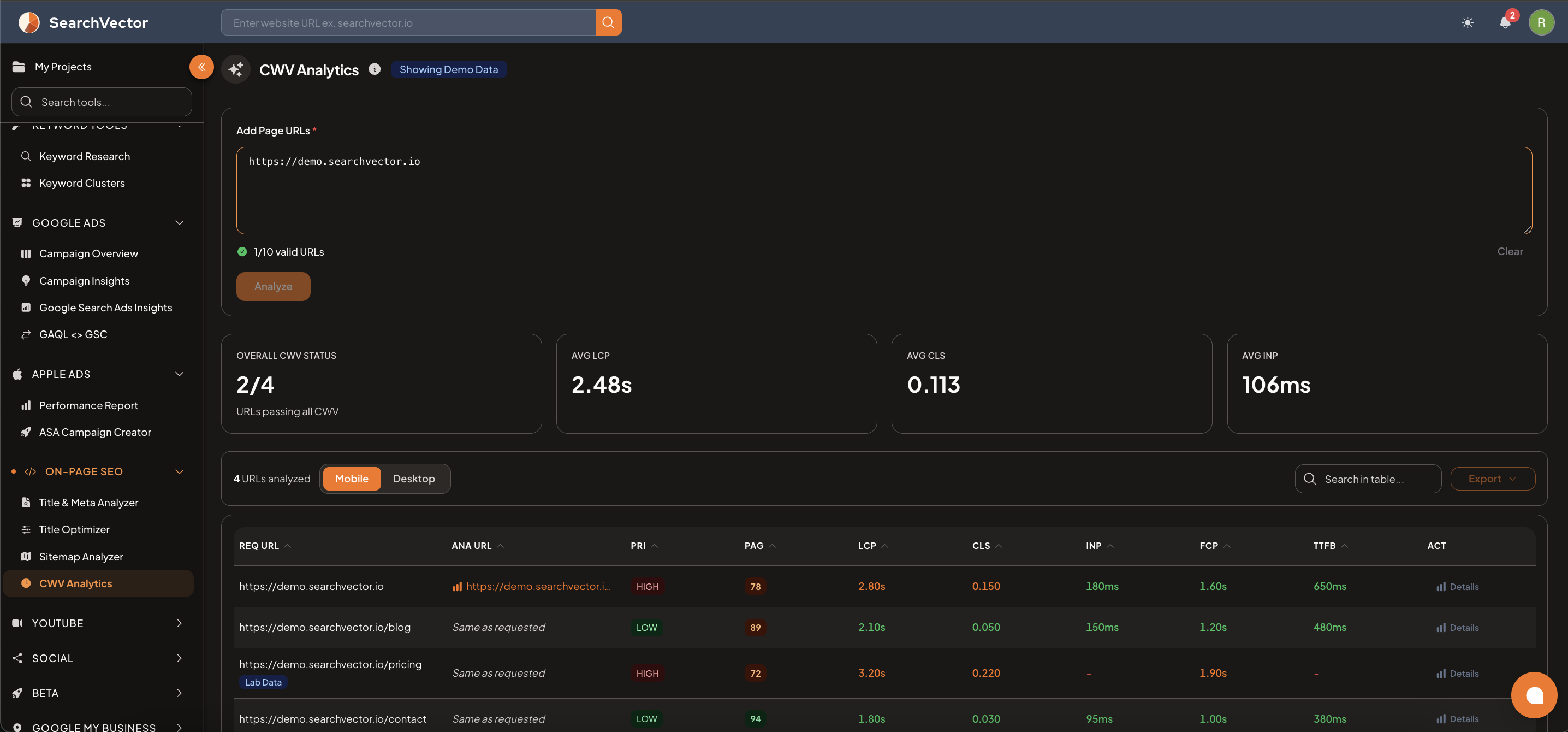
Analyze Core Web Vitals for up to 10 URLs at once — check LCP, CLS, INP, FCP, and TTFB across mobile and desktop to find and fix performance issues.
How to open
From the left sidebar, go to On-Page SEO → CWV Analytics.
How to use
- Paste up to 10 page URLs in the text area (one per line).
- Click Analyze.
- Toggle between Mobile and Desktop to compare results.
Summary cards
After analysis, 4 summary cards show overall performance:
| Card | Description |
|---|---|
| Overall CWV Status | Number of URLs passing all Core Web Vitals out of total analyzed (e.g., 2/4) |
| Avg LCP | Average Largest Contentful Paint across all analyzed URLs |
| Avg CLS | Average Cumulative Layout Shift |
| Avg INP | Average Interaction to Next Paint |
Results table
Each row represents one analyzed URL:
| Column | Description |
|---|---|
| REQ URL | The URL you entered |
| ANA URL | The actual URL analyzed (may differ after redirects) |
| PRI | Priority — HIGH or LOW based on traffic and performance |
| PAG | Page Score (0–100, higher is better) |
| LCP | Largest Contentful Paint (loading speed of main content) |
| CLS | Cumulative Layout Shift (visual stability) |
| INP | Interaction to Next Paint (responsiveness) |
| FCP | First Contentful Paint (time to first visible content) |
| TTFB | Time to First Byte (server response speed) |
| ACT | Actions — click Details for a full breakdown |
note
Some URLs may show a Lab Data badge instead of field data when real-user Chrome experience data (CrUX) is not available for that URL.
Core Web Vitals thresholds
| Metric | Good | Needs Improvement | Poor |
|---|---|---|---|
| LCP | ≤ 2.5s | 2.5s – 4.0s | > 4.0s |
| CLS | ≤ 0.1 | 0.1 – 0.25 | > 0.25 |
| INP | ≤ 200ms | 200ms – 500ms | > 500ms |
| FCP | ≤ 1.8s | 1.8s – 3.0s | > 3.0s |
| TTFB | ≤ 800ms | 800ms – 1800ms | > 1800ms |
Common fixes
LCP too slow:
- Optimize and compress hero images
- Use a CDN for faster asset delivery
- Remove render-blocking CSS/JS
CLS too high:
- Set explicit width/height on images and embeds
- Avoid inserting content above existing content
- Reserve space for ads and dynamic content
INP too high:
- Minimize JavaScript execution time
- Break up long tasks into smaller chunks
- Defer non-critical scripts
tip
Focus on HIGH priority pages first — these have the biggest impact on your overall performance score and user experience.