Topic Gap Analysis
Discover content topics your competitors rank for but you don't — powered by your Google Search Console data and competitor sitemap analysis.
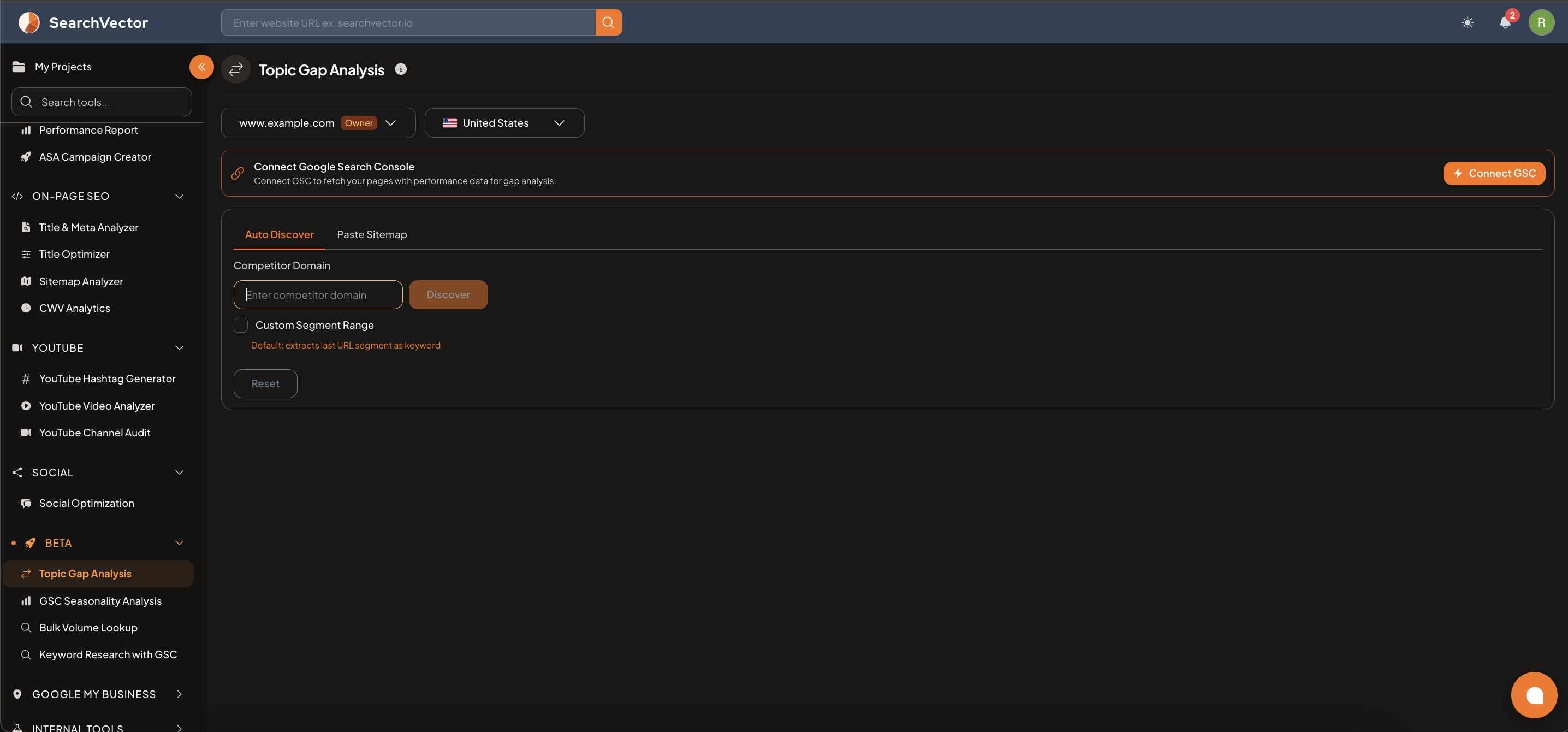
How to open
From the left sidebar, go to Beta → Topic Gap Analysis.
Requirements
- Google Search Console connected — the tool uses GSC data to fetch your pages with performance data for gap analysis.
- Connect GSC from the banner inside the tool or from Project Settings.
How to use
Step 1: Select your domain and country
Choose your Project domain and select a Country from the dropdown.
Step 2: Discover competitor topics
| Tab | How it works |
|---|---|
| Auto Discover | Enter a Competitor Domain and click Discover — SearchVector auto-discovers their pages and extracts topic keywords |
| Paste Sitemap | Manually paste a competitor's sitemap URL |
Custom Segment Range (optional): By default, the tool extracts the last URL segment as the keyword. Enable this to customize which segment to use.
Step 3: Review gaps
The results show topics the competitor ranks for that are missing from your content strategy — sorted by opportunity.
ヒント
Run Topic Gap Analysis against your top 2–3 competitors. Topics appearing in multiple competitor sitemaps are high-priority content opportunities.